Top cameras
Pan-tilt dome · 1080p · ONVIF

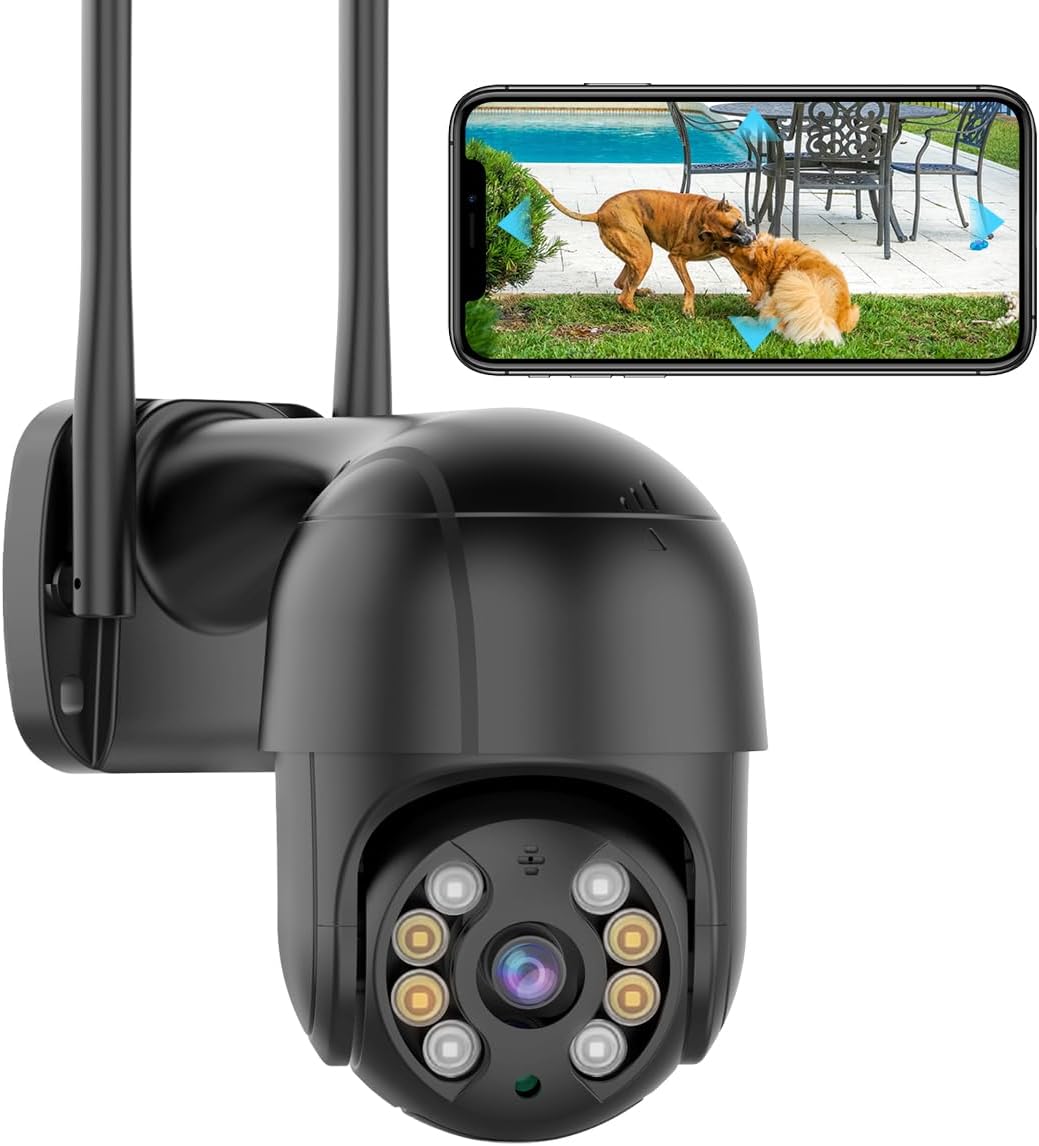
BESDERSEC A6 1080p Pan-Tilt Camera

A single-lens 1080p dome that pans 355°, tilts 90°, talks both ways and hands its stream to ONVIF recorders: the plain, dependable first camera for a yard.

  • Resolution1080p (1920 × 1080), one lens
  • Movement355° pan, 90° tilt
  • Wi-Fi2.4GHz, 5dBi antenna
  • RecordingmicroSD up to 128GB
  • WeatherIP66, -4°F to 140°F
  • RecordersONVIF: Blue Iris, ZoneMinder, NVRs
Fits well for
  • One camera to sweep a small yard, patio or side path
  • You record to Blue Iris, ZoneMinder or an ONVIF NVR
  • Your router already runs a 2.4GHz network
Choose another if
  • You need to read a plate at the far end of a long drive
  • You want to open the camera in a web browser
  • The mount point has no outlet within reach
See this camera

Sweep the whole yard as the A6 pans 355°

The BESDERSEC A6 is a 1080p dome on a motorised head: it turns 355° side to side and tilts through 90°, so one camera sweeps a yard that would otherwise need two fixed ones. It runs on the iCSee app, joins 2.4GHz Wi-Fi through a 5dBi antenna, and takes its power from a wall outlet.

What the moving head gives you from the first evening:

  • Pan and tilt from the phone. Drag the live image and the dome turns, so no corner of the yard stays out of reach.
  • Motion alerts with a snapshot pushed to the phone, and optionally to an email address or an FTP server.
  • Two-way audio via the mic and speaker in the dome, for a courier at the gate or a stranger by the shed.
  • A light and sound warning that fires when motion is detected.

The picture is Full HD, 1920 × 1080, from a single lens. That shows who crossed the lawn and what they carried at a few metres, but it will not read a plate at the far end of a driveway. The resolution guide sets out what each step up in pixels buys.

Night vision runs on four infrared LEDs and four white LEDs. On infrared the image turns black and white and the camera stays discreet. On the white LEDs it records in colour and tells a visitor plainly that they have been seen.

No web interface. BESDERSEC states that the A6 does not open in a browser. You watch it in the iCSee app, or you pull its stream into ONVIF software or a recorder.
Camera sheet

Lens, sensor and power

SpecValue
ModelBESDERSEC A6 (BES-XMHX)
AppiCSee
Resolution1080p Full HD, 1920 × 1080
Lenses1
Pan / tilt355° horizontal, 90° vertical
ZoomDigital
Night vision4 infrared LEDs + 4 white LEDs; colour or black-and-white
AudioTwo-way, built-in microphone and speaker
AlertsMotion detection, snapshot pushed to phone, email or FTP
DeterrentLight flash and sound alarm on motion
Wi-Fi2.4GHz, 5dBi antenna
Local storagemicroSD card up to 128GB
Third-party softwareONVIF: Blue Iris, iSpy, ZoneMinder, SecuritySpy, VLC, most ONVIF NVRs
Web interfaceNone
Weather ratingIP66
Operating temperature-4°F to 140°F
PowerPlug-in adapter, 3W
FormDome, wall-mounted
Dimensions3.9 × 4.3 × 6.3in

Record the A6 on Blue Iris or an ONVIF recorder

ONVIF support is the reason many installers choose the A6 over a cheaper app-only dome. The camera speaks the open standard that recorders and PC software use, so its footage does not have to live only on a card inside the housing.

BESDERSEC names the software the A6 works with:

  • Blue Iris and iSpy on a Windows PC
  • ZoneMinder on a Linux server
  • SecuritySpy on a Mac
  • VLC for a quick look at the stream
  • Most ONVIF network video recorders

Set the camera up in the iCSee app first, give it a reserved address on the router, then add it to the recorder. A fixed address stops the recorder losing the camera after a power cut, when the router might otherwise hand it a new one. The RTSP and ONVIF guide lists the stream paths and ports iCSee cameras use.

Recording in two places is the safer habit. The microSD slot accepts cards as large as 128GB, so the camera keeps its own copy when the recorder is off. The recorder, in turn, keeps a copy that nobody can pull out of the dome.

When a recorder refuses the camera, the cause usually sits on the recorder's side. Some NVR brands accept only their own cameras, and others need ONVIF switched on channel by channel:

  1. Confirm the recorder lists ONVIF as a supported protocol.
  2. Enable ONVIF or third-party cameras on the channel you are adding.
  3. Enter the camera's address and the login you set in iCSee.
  4. Check that the main stream plays before you schedule recording.

Keep the iCSee app on your phone even after the recorder takes over. Two-way talk, alert settings and firmware updates still run through it, and it offers the fastest way to swing the dome toward a noise at night.

In the iCSee range

Where it stands among iCSee cameras

iCSee camera models by type, September 2026. Highlighted: BESDERSEC A6 1080p Pan-Tilt Camera.

Mount the A6 dome under the eaves

The A6's IP66 housing is rated for -4°F up to 140°F, which covers a wet autumn and a hot summer on most walls. It still lasts longer where a soffit keeps driving rain and midday sun off the dome.

  1. Pair it indoors. Power it beside your router, pair it by QR code in iCSee on the 2.4GHz band, and update the firmware. The setup guide covers each pairing method.
  2. Test the signal at the mount. Hold the camera where it will hang and watch live view. The 5dBi antenna helps, but brick and stucco still cost signal.
  3. Hang it 8 to 10 feet up. High enough to be out of easy reach, low enough to see faces rather than hat brims.
  4. Loop the cable. Form a drip loop below the connector so rain falls off before it reaches the joint.
  5. Save a home position. Aim the dome at the path to the door and store it, so the camera returns there after it moves.

The A6 needs a wall outlet within reach of its adapter lead. The word wireless on the box refers to the video travelling over Wi-Fi; power still arrives down a cable. Where no outlet exists, a PoE camera on one Ethernet run or a solar model fits the spot better.

BESDERSEC gives the dome as 3.9 × 4.3 × 6.3 inches with a 3W draw. That is small enough to sit beside a porch light without drawing the eye, and a camera that blends in is less likely to be knocked off the wall.

Point the head away from the street before you enable motion alerts. A dome that watches passing cars all evening sends alerts nobody reads, and the one that matters gets lost among them.

Other ways to cover it

Three other cameras

2 GESKS Single-Lens PTZ Camera
More detail, network port GESKS Single-Lens PTZ Camera
The GESKS single-lens PTZ records 4K 8MP and takes an Ethernet cable where Wi-Fi is weak.
  • 8MP 4K · 1 lens
  • Pan & tilt from the app
  • Runs on the iCSee app
See this camera

Choose the A6 or add a second lens for a wide drive

The A6 is the plain, proven pan-tilt of the iCSee range: one lens, one head, one outlet. Other cameras on the same app add what it leaves out, and each suits a different spot on the property.

CameraWhat it addsPick it when
BESDERSEC A6The baseline: 1080p, 355° pan, ONVIFA small yard, a side passage, one approach
SDTNOVA dual-lensA fixed 3MP lens above a 3MP tracking lens, 5GHz Wi-FiA wide yard where the scene must stay in frame while the head turns
GESKS single-lens4K 8MP picture, network portFaces at a distance, or a wired link
HIKJBSET PoE bulletOne-cable power, metal IP67 body, browser accessA fixed view with no Wi-Fi to rely on

Three things to confirm first:

  • Your router offers a 2.4GHz network, since the A6 does not join 5GHz.
  • An outlet sits within reach of the mount point.
  • Your recorder or PC software supports ONVIF, if you plan to record off the camera.

The weak moment of any single-lens pan-tilt is the turn. While the dome is turned toward one side of the grass, everything else in the yard drops out of frame. On a narrow side path that hardly matters; on a wide front yard with two approaches, a dual-lens camera closes the gap. Many homes use both: the A6 on the side passage, a two-lens model at the front, all under one app login.

For a camera that has dropped offline or lost its password, the offline fixes and the reset guide cover the A6 along with the rest of the range.

Installer answers

Setup and storage questions

Does the BESDERSEC A6 work with Blue Iris?

Yes. It supports ONVIF, and BESDERSEC names Blue Iris, iSpy, ZoneMinder, SecuritySpy, VLC and most ONVIF recorders.

Can I open the A6 in a web browser?

No. The A6 has no web interface; use the iCSee app, ONVIF software or a recorder.

Does the A6 connect to 5GHz Wi-Fi?

No. It joins 2.4GHz networks only, so give the 2.4GHz band its own name if pairing fails on a combined network.

What microSD card does the A6 take?

Cards up to 128GB. Choose a card made for continuous video and format it in the iCSee app.

How far does the A6 turn?

It pans 355° horizontally and tilts 90° vertically, controlled from the phone.