Top cameras
Dual-lens PTZ · 3MP + 3MP · 2.4 / 5GHz

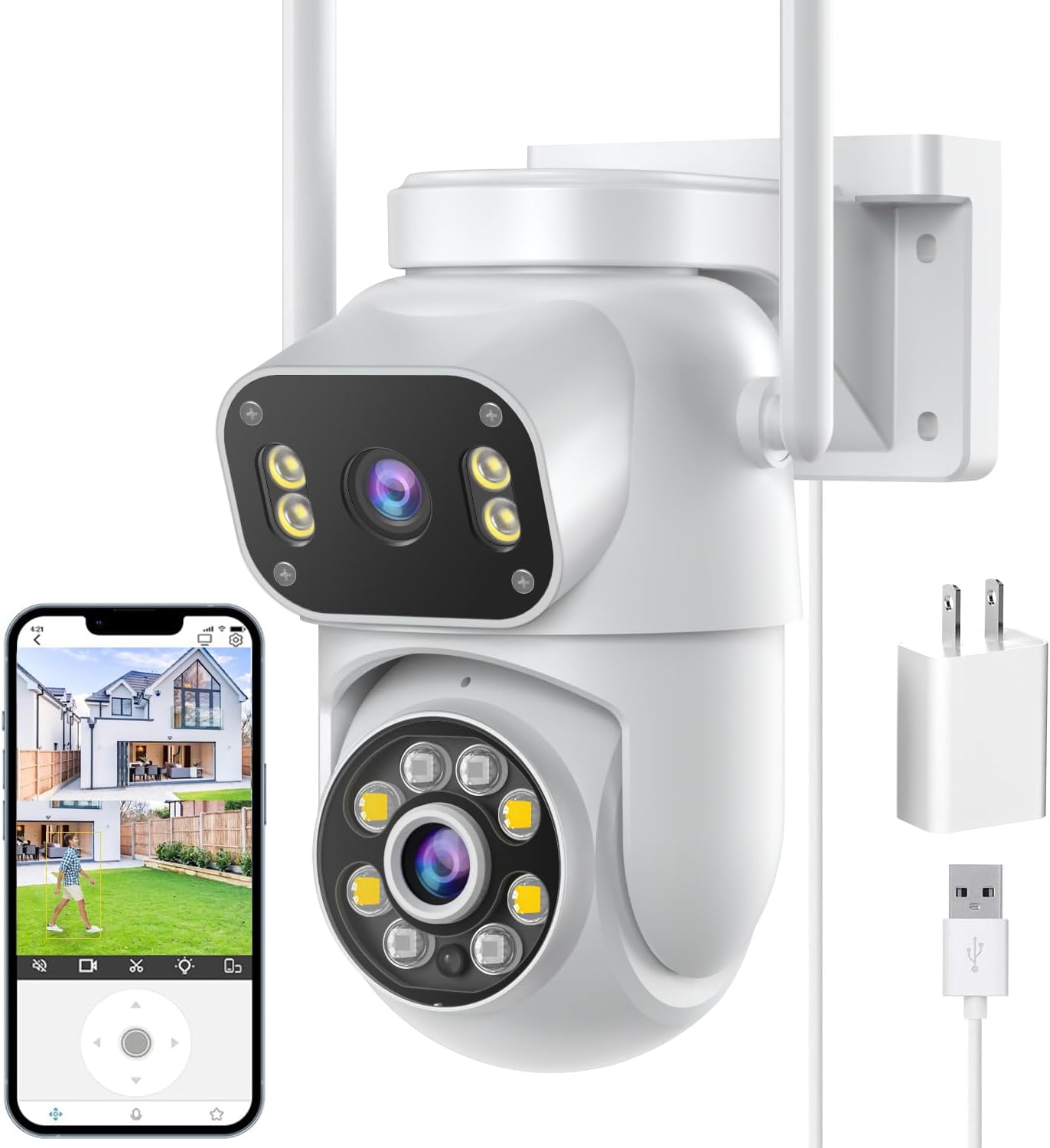
SDTNOVA Dual-Lens Linkage PTZ Camera

Two 3MP lenses in one housing: the upper one holds the whole scene, the lower one pans and tilts to follow a person, and a tap on the wide view sends it wherever you point.

  • Resolution6MP total: 3MP + 3MP
  • LensesFixed upper lens, pan-tilt lower lens
  • Wi-Fi2.4 + 5GHz (grey version 2.4GHz only)
  • ZoomUp to 5x digital
  • StoragemicroSD up to 128GB, optional cloud
  • WeatherIP66
Fits well for
  • A wide yard that must stay in frame while the camera follows someone
  • A crowded 2.4GHz band and a router close enough for 5GHz
  • Recording to Blue Iris, a Synology or a 6MP-capable NVR
Choose another if
  • Reading a plate at the far end of a long drive
  • A mount point with no outlet nearby
  • An older NVR limited to 4MP streams
See this camera
Plugs & bundles

White, grey or the LAN version

Keep the gate in view while the SDTNOVA lens follows

The SDTNOVA camera answers the classic pan-tilt problem: when the head turns to follow one person, it stops watching everything else. Here the upper 3MP lens is fixed and keeps the whole scene, while the lower 3MP lens rides the pan-tilt head and does the following.

The two lenses work as a linked pair, which is what SDTNOVA means by linkage:

  • Automatic tracking. Human detection sets the lower lens following a person until they leave the view, then it returns to its default point.
  • Tap to aim. Touch a spot on the upper, fixed image and the moving lens swings there and locks on.
  • Both views on one screen. The iCSee app stacks them, fixed view on top and pan-tilt view below.
  • Fewer false alerts. Detection is triggered by people, and SDTNOVA says it ignores waving leaves, flies, dust and changes of light.

Resolution is 3MP per lens, sold as 6MP in total. Each view is its own 3MP picture, so a face framed by the lower lens is larger and clearer than the same face in the wide view. Up to 5x digital zoom stretches it further on the phone.

Why the fixed lens matters. A lone pan-tilt camera tracking a courier across the lawn will miss a second person at the side gate. The SDTNOVA's wide lens records that gate the whole time.

Two-way audio, built-in floodlights and an IP66 housing complete the outdoor kit. SDTNOVA quotes colour night vision up to 10m, so the camera suits a yard or drive of ordinary depth rather than a long field.

Set the default point with care, because the tracking lens returns there after every chase. The front door, or the path leading to it, is the usual choice.

Camera sheet

Lens, sensor and power

SpecValue
ModelP11
AppiCSee
Resolution6MP total, 3MP per lens
Lens layoutFixed upper lens, pan-tilt lower lens
LinkageTap the fixed view to aim the pan-tilt lens
TrackingHuman detection; follows the person, then returns to its default point
ZoomUp to 5x digital
Night visionBuilt-in floodlights, full-colour night vision up to 10m
AudioTwo-way, built-in microphone and speaker
Wi-Fi2.4GHz and 5GHz (grey version: 2.4GHz only)
No-router modeAP hotspot mode; PTZ control within hotspot range
Local storagemicroSD up to 128GB, 24/7 recording
CloudEncrypted cloud storage, optional
Third-partyONVIF: Blue Iris, iSpy, tinyCam, IP Cam Viewer, QNAP, Synology; NVR must handle 6MP+
Network portsHTTP 80, RTMP 1935
Weather ratingIP66
PowerPlug-in adapter; PoE only through an extra splitter
ResetButton left of the SD slot, hold 10 seconds
Dimensions8.8 × 5.3 × 5.1in
In the boxCamera, power adapter, mounting screws, manual; LAN version adds a 3m power extension

Put the SDTNOVA on 5GHz or 2.4GHz Wi-Fi

Most iCSee cameras join 2.4GHz only, but the white and LAN versions of the SDTNOVA also join 5GHz. That choice weighs more on a dual-lens camera than on a single one, because two video streams share the same wireless link.

BandBehaviourChoose it when
2.4GHzLower data rate, larger coverage areaThe camera is far from the router or behind a wall
5GHzHigher data rate, smaller coverage areaThe router is close and 2.4GHz is crowded with neighbouring networks
  1. Pair the camera in the iCSee app with the phone on the band you plan to use.
  2. Check live view on both lenses at the mount point before drilling.
  3. If the picture stutters, drop the image quality to standard definition in the app or bring the router closer.

The grey version joins 2.4GHz only. Where the 2.4GHz signal is strong at the mount, it does the same job; if you were counting on 5GHz, choose the white or the LAN version. The setup guide explains how to split a combined network name so the phone and camera land on the same band.

No router at all? The camera has an AP mode that broadcasts its own hotspot. It keeps recording to the card, and a phone standing within hotspot range can watch and steer it, which suits a barn or a site cabin.

The LAN version also takes a network cable, the steadiest link of all for a camera on a garage wall. When a Wi-Fi camera keeps dropping, the offline fixes take the usual causes in order.

In the iCSee range

Where it stands among iCSee cameras

iCSee camera models by type, September 2026. Highlighted: SDTNOVA Dual-Lens Linkage PTZ Camera.

Store the SDTNOVA footage on a card and an NVR

The SDTNOVA records events to a microSD card, and the iCSee app plays back and downloads clips without a subscription. Buy the card with the camera: SDTNOVA says to insert one before use, and the LAN version states that none comes in the box.

  • Card size: up to 128GB, enough for round-the-clock recording.
  • Cloud: encrypted cloud storage as an optional paid extra.
  • Downloads: save a clip from playback to the phone as evidence.
  • App ads: in iCSee, open Me, then Tool, and slide the switch to turn them off.

For a recorder, the camera speaks ONVIF. SDTNOVA lists Blue Iris, iSpy, tinyCam and IP Cam Viewer, plus QNAP and Synology NAS surveillance. One condition catches people out: the NVR must accept streams of 6MP or more.

The HTTP port is 80 and the RTMP port is 1935, which helps when a firewall sits between the camera and the recorder. Stream paths for RTSP are on the RTSP and PC page.

Power over Ethernet works only through an extra PoE splitter, which separates power from data at the camera end. Out of the box the camera wants its plug-in adapter, and the LAN version adds a 3m extension cable to reach a farther outlet.

Forgot the camera password? Hold the reset button, to the left of the SD slot, for 10 seconds, then pair the camera again. The reset guide also covers unbinding it from an old account.

Card life in days turns on bitrate, motion and whether both lenses record around the clock. Two 3MP streams fill a card faster than a single 1080p stream, so continuous recording on 128GB covers fewer days than it would in a one-lens dome. Event recording stretches it, and the SD card guide works through the arithmetic.

Other ways to cover it

Three other cameras

1 Siosaxdot Q6 Dual-Lens PTZ Camera
Upper lens you aim by hand Siosaxdot Q6 Dual-Lens PTZ Camera
The Siosaxdot Q6 sets its upper lens across 120° at install while the lower lens pans 355° and tracks people.
  • 1080p (2MP) · 2 lenses
  • Pan & tilt from the app
  • Runs on the iCSee app
See this camera
2 GESKS 6MP Dual-Lens PTZ Camera
Warning light and Ethernet GESKS 6MP Dual-Lens PTZ Camera
GESKS's 6MP dual-lens pairs two 3MP lenses with a flashing warning light and a network port.
  • 6MP (3MP + 3MP) · 2 lenses
  • Pan & tilt from the app
  • Runs on the iCSee app
See this camera

Pick the SDTNOVA over a single-lens dome or a 3-lens zoom

The SDTNOVA fills the midpoint of the iCSee range: more coverage than a single-lens dome, less reach than a three-lens zoom. It wins on a wide front yard or drive of ordinary depth, watched from one corner of the house.

CameraLensesNetworkBest spot
SDTNOVA dual-lens3MP fixed + 3MP pan-tilt2.4 + 5GHzWide yard, busy Wi-Fi
Siosaxdot Q6Hand-aimed upper lens + pan-tilt lens2.4GHzA gate you aim at once and leave
GESKS 6MP3MP fixed + 3MP pan-tilt2.4GHz + EthernetWalls where a cable can reach
BESDERSEC A6One 1080p lens2.4GHzA side path or small patio

It fits well when:

  • The full yard must be recorded while the camera follows someone.
  • Your 2.4GHz band is crowded and the router is near enough for 5GHz.
  • You record to Blue Iris, a Synology or an NVR that handles 6MP.

Look elsewhere for reading a plate at the far end of a long drive. That is a job for optical zoom, covered on the PTZ zoom page, and a mount with no outlet is better served by a PoE or solar camera.

Among the three versions, the white one is the safe default. Choose grey only if 2.4GHz is strong at the mount, and the LAN version if you want a cable option or the longer power lead.

Mount it at a corner of the house rather than mid-wall. From a corner the fixed lens looks along two sides of the plot, and the tracking lens has the widest arc to follow someone before the wall blocks its view.

Installer answers

Setup and storage questions

Does the SDTNOVA dual-lens camera work on 5GHz Wi-Fi?

The white and LAN versions join both 2.4GHz and 5GHz. The grey version joins 2.4GHz only.

What resolution is each SDTNOVA lens?

Each lens records 3MP; the 6MP figure is the two added together.

Does it need a subscription?

No. Playback from the microSD card works without one; encrypted cloud storage is optional.

Will the SDTNOVA work with my NVR?

It supports ONVIF, but the NVR must accept 6MP or higher streams. PoE needs an extra splitter.

Where is the reset button?

To the left of the SD card slot. Hold it for 10 seconds, then pair the camera again.